Mergify Billing System
Understand how Mergify fair billing works.
This page explains how Mergify’s contributor-based billing works and how to read your invoice.
Contributor-Based Billing
Section titled Contributor-Based BillingMany enterprise solutions charge per user, irrespective of actual usage. At Mergify, we firmly believe in billing you only for what you actively use.
This is why our billing system operates on the principle of contributors. Here’s how it works:
-
A contributor is any user who contributes commits to a pull request, either by opening it or by pushing new commits to it. Other activity, such as reviewing, commenting on, closing, or reopening a pull request, does not make someone a contributor.
-
Each user is counted only once, even if they contribute to pull requests across multiple repositories.
-
The system uses a 30-day sliding window. A user is counted as a contributor for 30 days after they open a pull request or push commits to one. After that period, if they make no further contributions, they are no longer considered active for billing purposes.
-
Usage is prorated to the day: if a contributor is seen active during 48 days, the system only bills for precisely 48 days, not 2 entire months.
Estimating Contributors
Section titled Estimating ContributorsIf you don’t know the number of contributors that Mergify might count, you can use this script to estimate the number of contributors over the last 30 days.
-
Go to https://github.com/settings/tokens (or the equivalent page on your GitHub Enterprise Server installation, at
https://<your-ghes-host>/settings/tokens) to create a token. The token must have the permissions to access the repository (read permission is enough); -
Export the token as an environment variable with
export GITHUB_TOKEN=<your-token>; -
Install
requestson your system by runningpython3 -m pip install requests; -
Run the script with
python3 mergify-count-contributors.py <repo1-url> <repo2-url> etc, passing the list of repositories where Mergify will be deployed. Use the full repository URLs, including the host, so the script can reach the right API endpoint (for examplehttps://github.com/org/repofor GitHub.com orhttps://github.example.com/org/repofor GitHub Enterprise Server).
The script will run and print its progress. It can take several minutes for the script to complete depending on the number of repositories scanned and the number of active pull requests they have.
Annual Subscription
Section titled Annual SubscriptionMergify does not require an annual subscription (except for the Enterprise plan), but offers a large discount if you buy users in advance for a 12-month period.
An annual subscription allows you to buy a base number of seats (users) per product at the start of the year. If your usage goes beyond the pre-purchased seats, additional seats are billed monthly, prorated to the exact day of use.
For example, let’s say you have purchased an annual license for 100 users. If your number of users increases to 110 users during 45 days, you will be invoiced for 10 extra users over 45 days.
Checking Current Usage
Section titled Checking Current UsageYou can check your current usage by going through Mergify dashboard settings and clicking on the Usage panel.
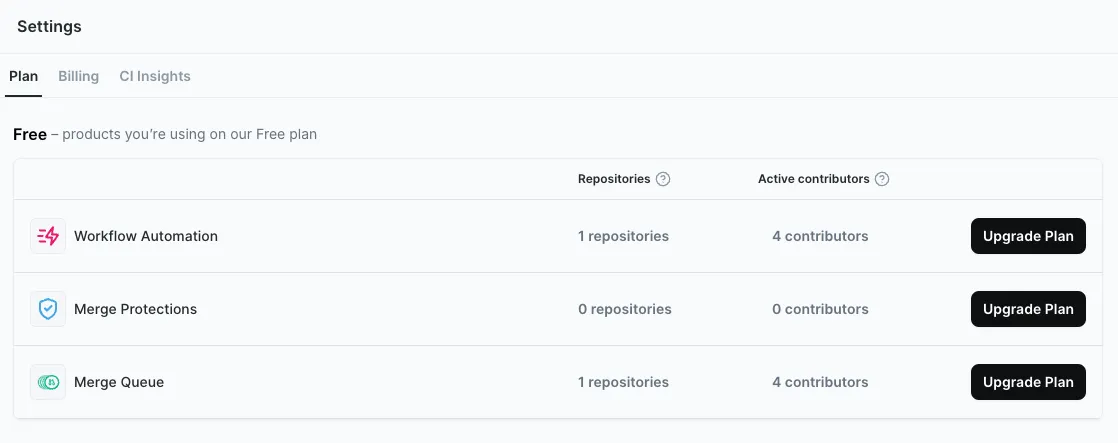
You can then click on the number of contributors to get the list of active users for each product.
Switching or Cancelling Plans
Section titled Switching or Cancelling PlansIf you wish to switch between plans or cancel your subscription, please contact our customer support. They’ll guide you through the process and ensure a smooth transition.
When you cancel, your subscription stays active until the end of the billing period you already paid for, and it does not renew. You may still receive one last invoice on that final day (see Final Invoice After Cancellation below).
Understanding Your Invoice
Section titled Understanding Your InvoiceOur billing system aims for fairness, but its dynamic nature may result in invoices that can be complex to understand at first glance. A regular invoice comprises two main sections. Cancelling your subscription produces one more invoice, which works differently and is covered last.
1. Real-time User Adjustment
Section titled 1. Real-time User AdjustmentOur system continually monitors the number of users in your repositories and adjusts your bill in real-time. On your invoice, you might see line items labeled “remaining” and “unused time.” These adjustments occur whenever there’s a change in your user count.
For instance, if the system identifies a change in your user count, it will credit you for the number of users you previously paid for, prorated by day. It then charges for the updated user count for the remaining days of the billing cycle.
In the following example, the initial bill was for 76 users. As this grew to 77, the system credited the $1,360.92 previously paid. It then charges $1,378.83, leading to an increase of $17.91 to account for the additional user for the rest of the month.

2. Upcoming Period Charge
Section titled 2. Upcoming Period ChargeThe latter part of the invoice projects your charges for the next billing cycle, such as from Jul 14th to Aug 14th. This charge is based on the current number of contributors. If there’s a change in this user count during this period, the subsequent invoice will account for this, similar to the real-time adjustment mentioned earlier.

3. Final Invoice After Cancellation
Section titled 3. Final Invoice After CancellationWhen you cancel your subscription, it stays active until the end of the billing period you already paid for, then ends without renewing. You may still receive one last invoice dated on that final day.
That last invoice covers your final billing period, not a renewal. It collects the real-time user adjustments described above: when your user count changes mid-period, the prorated difference is only settled on the next invoice, which for a cancelled subscription is the final one, issued when the period ends. So if your team grew during your last month, that growth is billed on the day your subscription ends. Once you pay it, you won’t be charged again.
By understanding how your invoices are built, you can more easily interpret and anticipate how changes in your contributors influence your Mergify charges.
Was this page helpful?
Thanks for your feedback!